Sift
Price comparison for any shop you name
- Role
- Concept, design system, every screen, Firestore schema, scraping pipeline and tests
- Team
- Solo
- When
- 2026, in development
SIFT
A landscape-first price comparison app that streams live scraped prices and teaches you what those prices mean.















Table of contents
- Project overview
- Screens
- Walkthrough
- Features
- How it works
- Technologies used
- Installation
- Usage
- Data model
- Testing
- Project structure
- Project status
- Team and contributions
- Acknowledgements
- Licence
Project overview
Price comparison sites only compare the retailers they have deals with. If a shop is not on the list, it does not exist as far as the comparison is concerned, and the shopper has no way to tell whether the price they are looking at is good.
SIFT inverts that. The user supplies the retailer sites they actually care about, SIFT works out where the product lives on each one, reads the price off the page and streams the results back as they land. Nothing is hardcoded to a retailer, so any site the user can name is a site SIFT will try.
What makes it different
| User-supplied sources | No fixed retailer list. Paste a domain and SIFT attempts it. |
| Real-time streaming | Prices appear one at a time as each source resolves, driven by Firestore listeners rather than a refresh button. |
| Honest confidence | Every result carries an extraction tier and a match confidence. Low-confidence matches go to a confirm step instead of quietly being wrong. |
| Price literacy | The compare screen shows the band from lowest to highest, the spread and where each retailer sits in it, so the user learns what a good price is rather than just being told one. |
| Save and resume | Leave at any step and pick the search up from the home screen. The scan carries on server-side while the app is closed. |
| Landscape-first | Comparison is a horizontal problem. The core screens are designed for landscape, with a portrait layout for smaller devices. |
Design constraints
The project is built against three fixed inspiration cards, and every major decision traces back to one of them.
| Card | Drawn | How SIFT answers it |
|---|---|---|
| Goal theme | Learn Something | The price band, spread, match confidence and one plain sentence on how to read them. The user learns how to read a price, not just what it is. |
| Device interaction | Real-Time Data | Firestore listeners fill in scan rows and price drops as they happen. |
| Constraint | Landscape Support | A two-column landscape layout, title on the left and results on the right, stacking to one column in portrait. Rotation is allowed, not locked. |
Screens
The interface is built from the Screen preview v2 page of the SIFT Figma file. These mockups are the real React Native views rendered on web with sample data, at phone sizes (390 × 844 portrait, 844 × 390 landscape). Every screen inside a search carries the four-step tracker: Sources, Scan, Confirm, Compare.
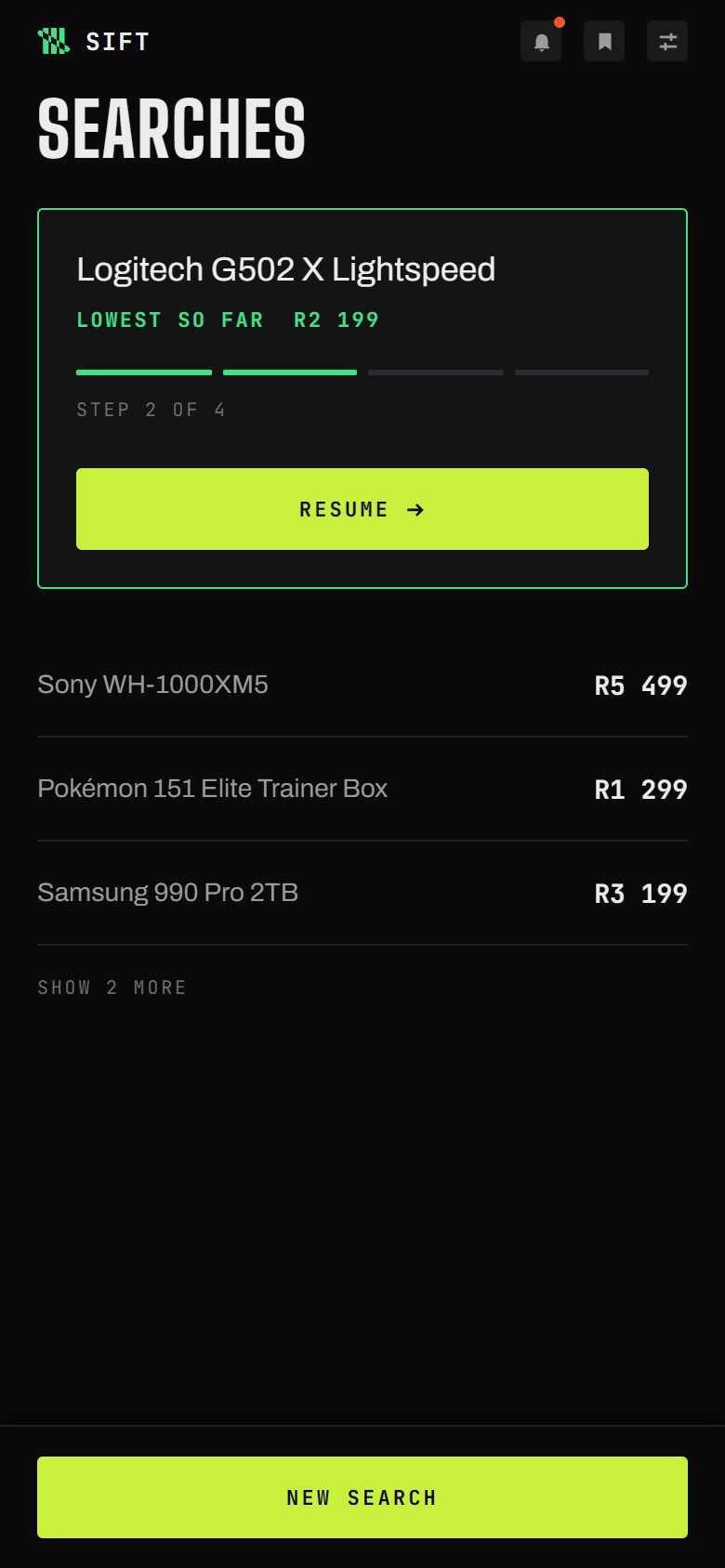 01 Home · resume where you left off |
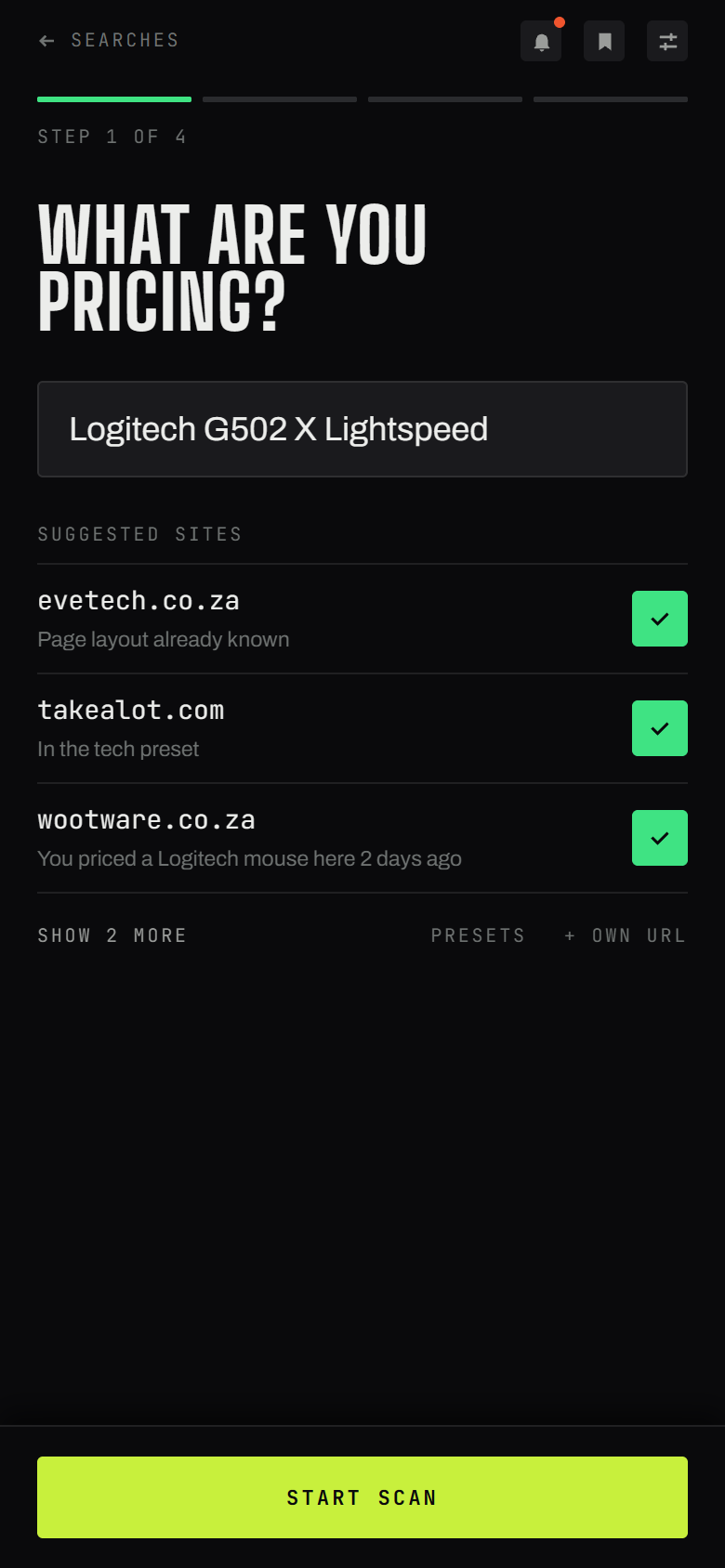 02 New search · suggested sites, each with a reason |
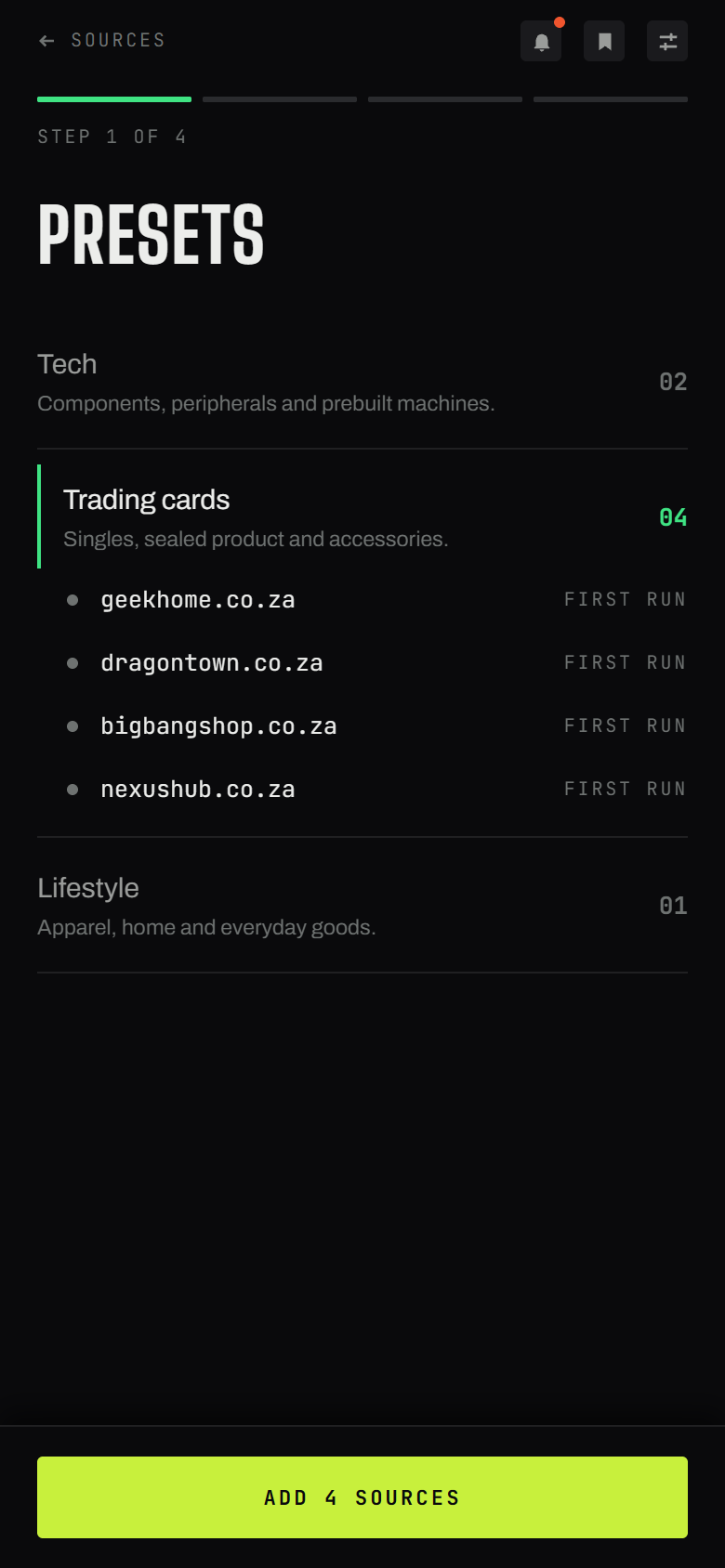 12 Presets · curated source bundles |
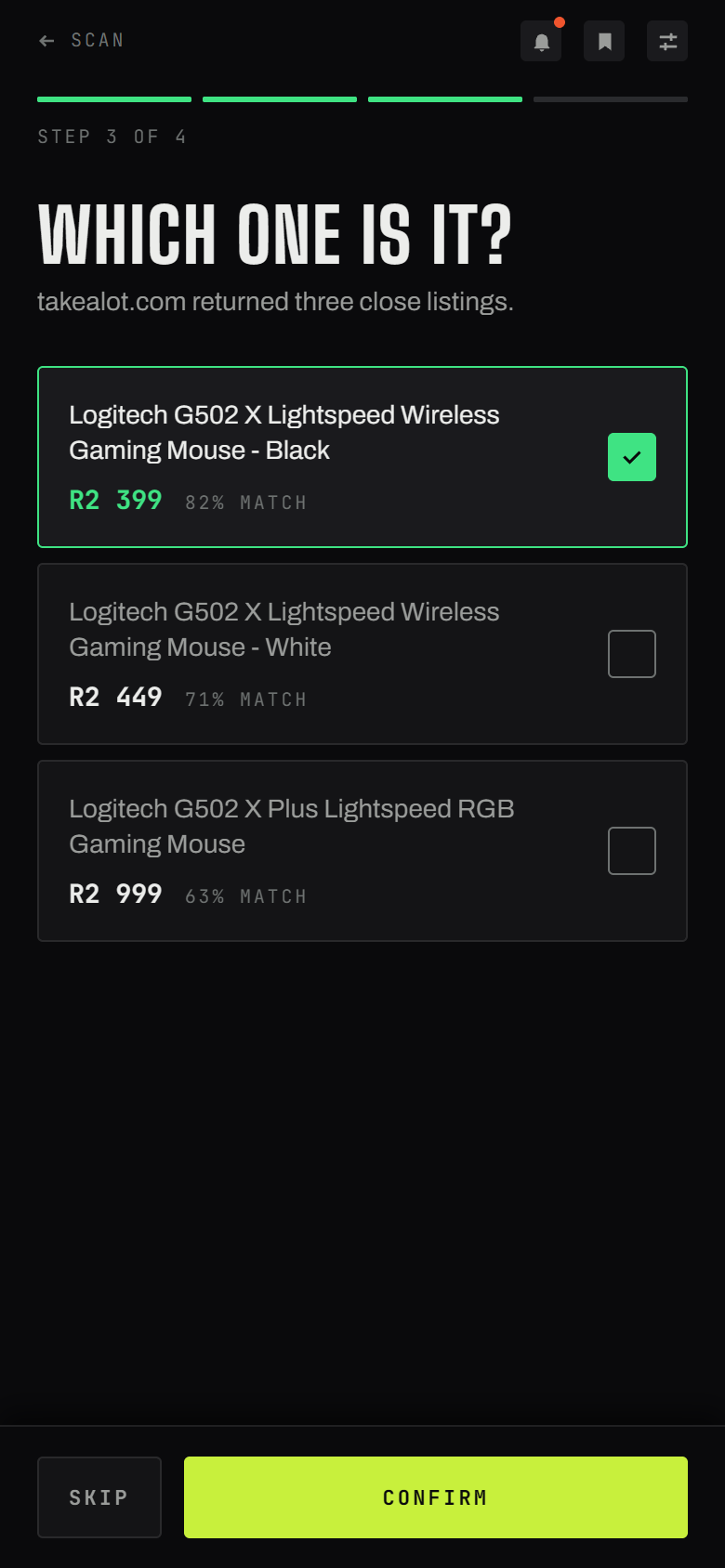 03 Confirm match · pick the right listing |
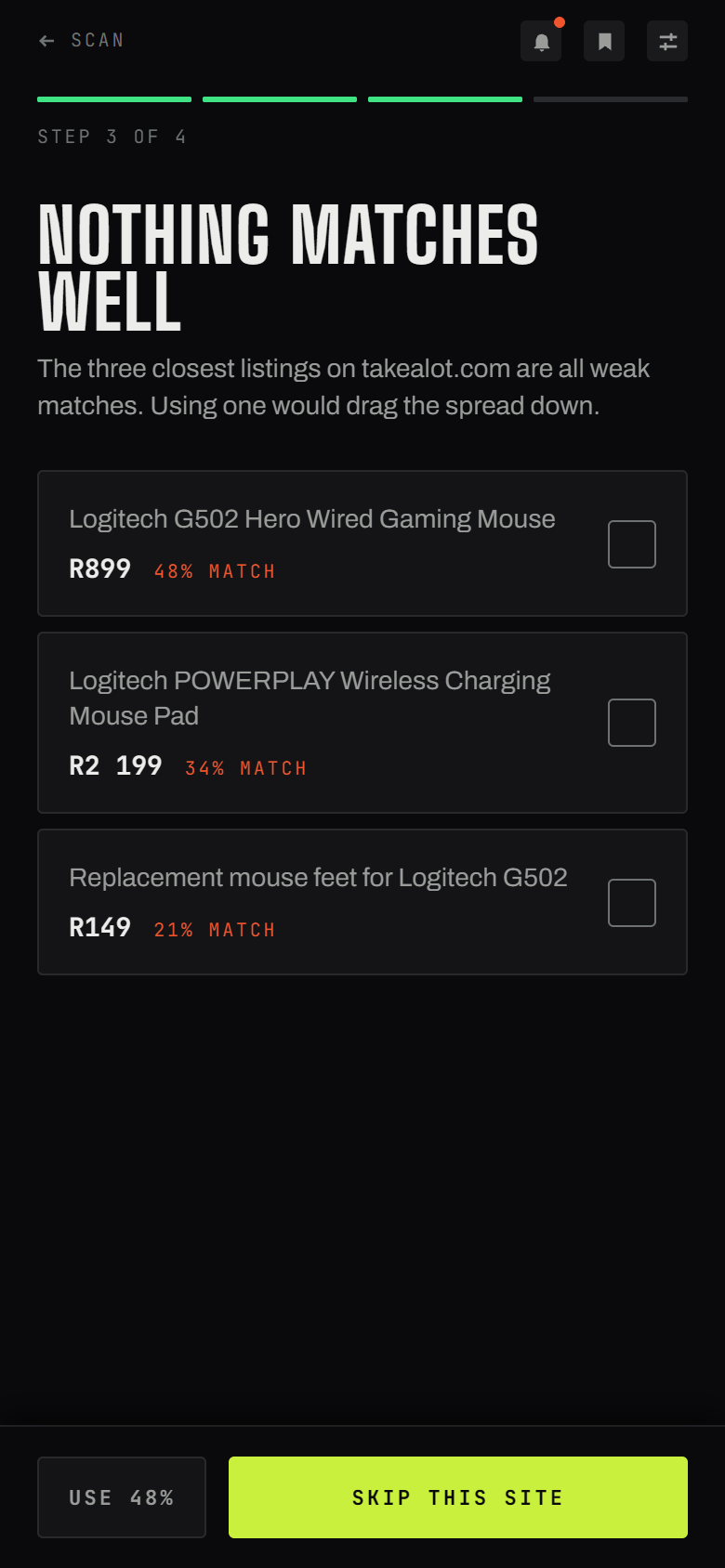 06 Weak match · skipping is the safe default |
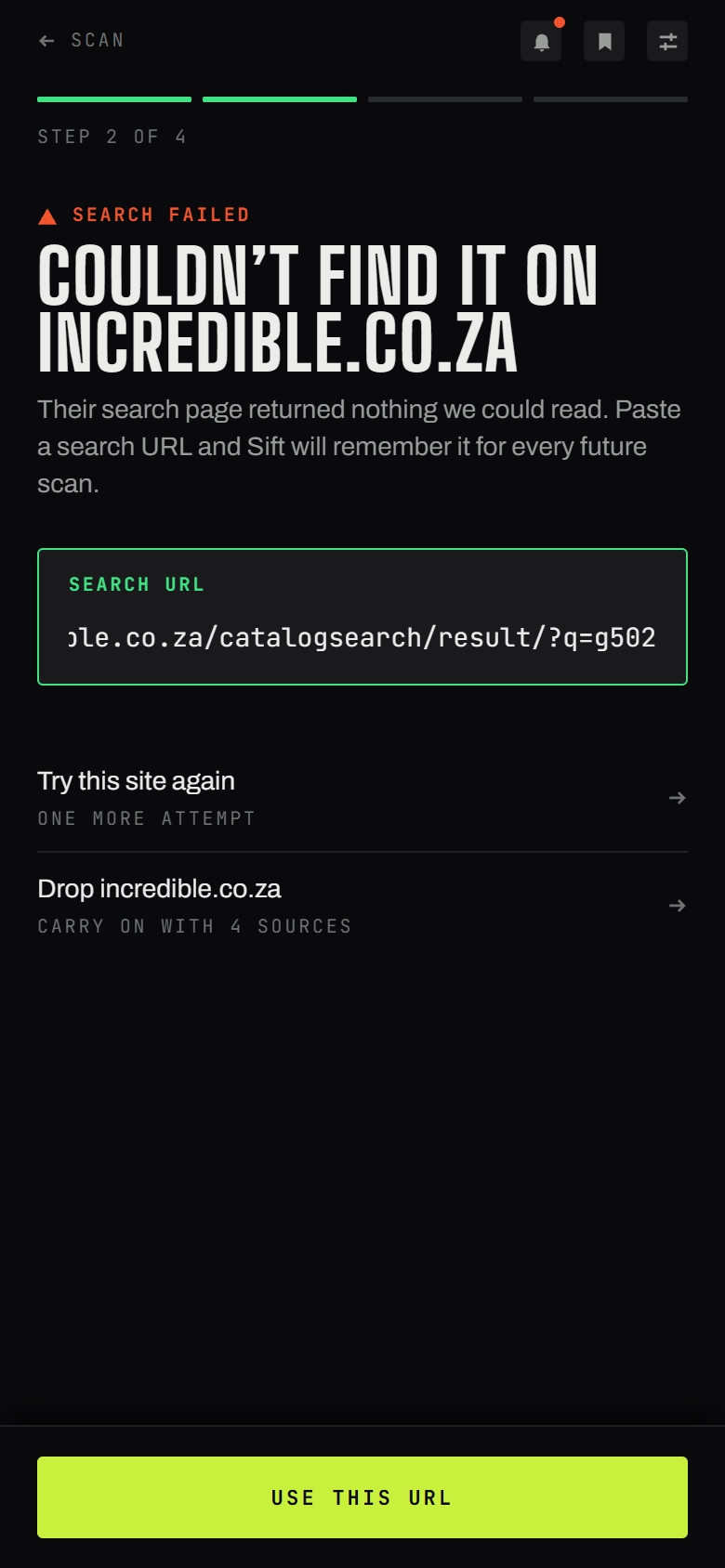 07 Site failed · paste a search URL once |
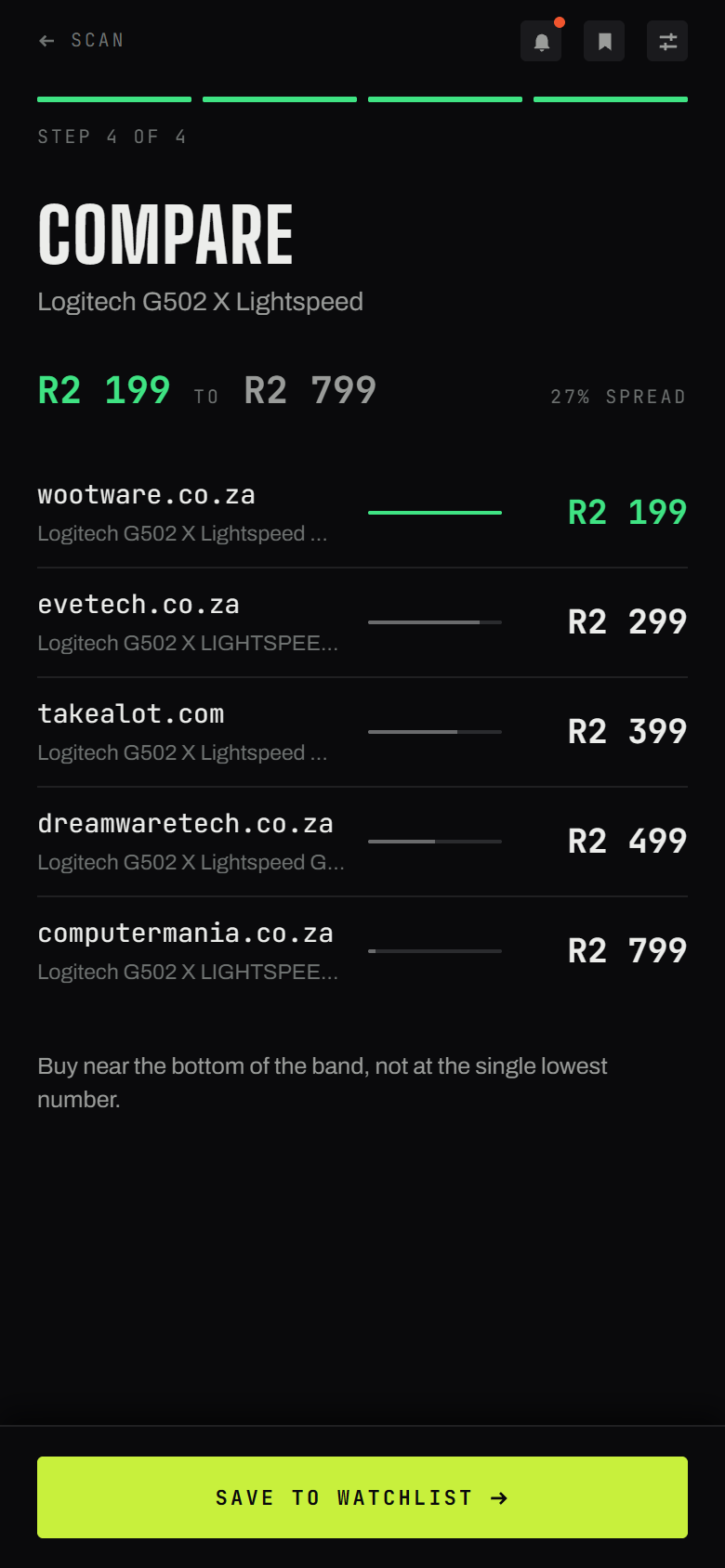 Compare · portrait |
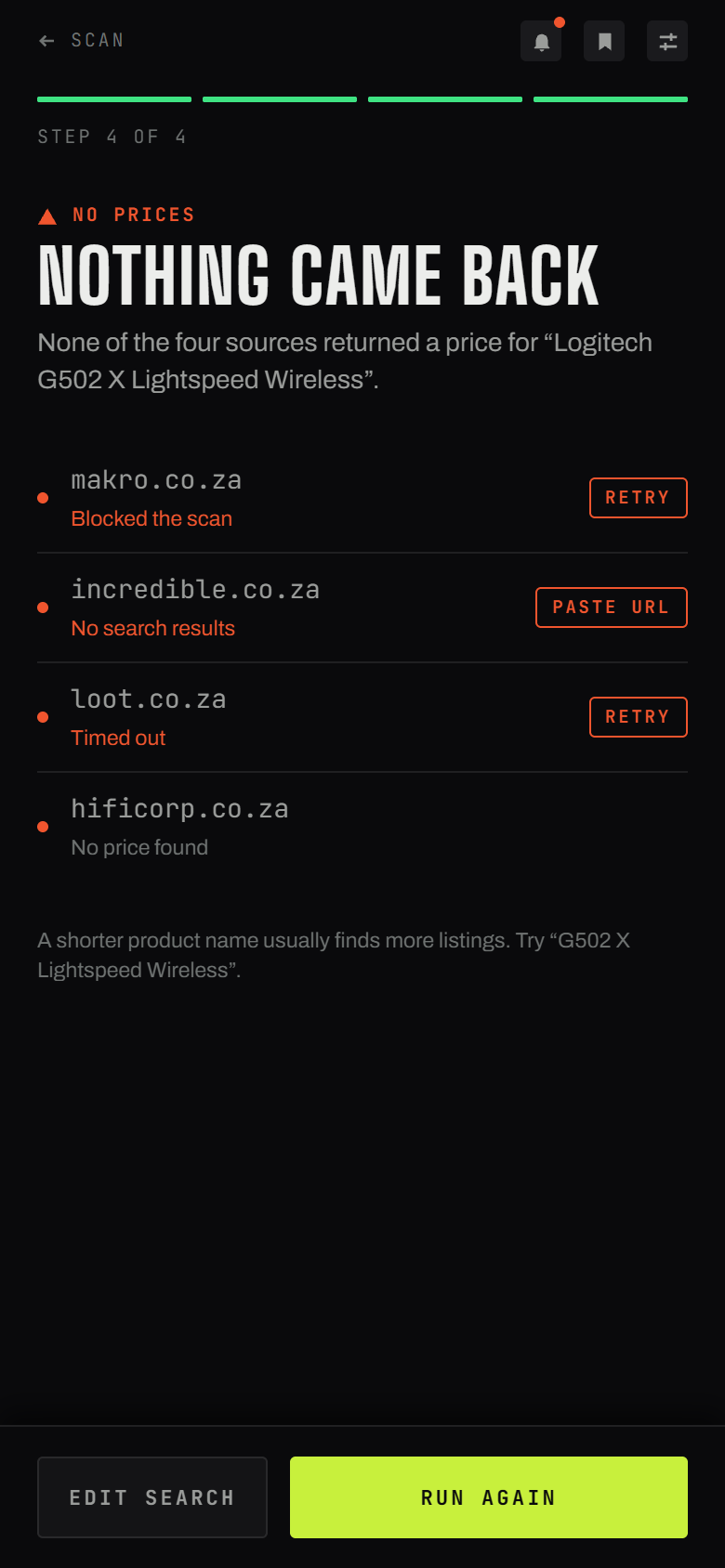 11 No results · a cause and fix per source |
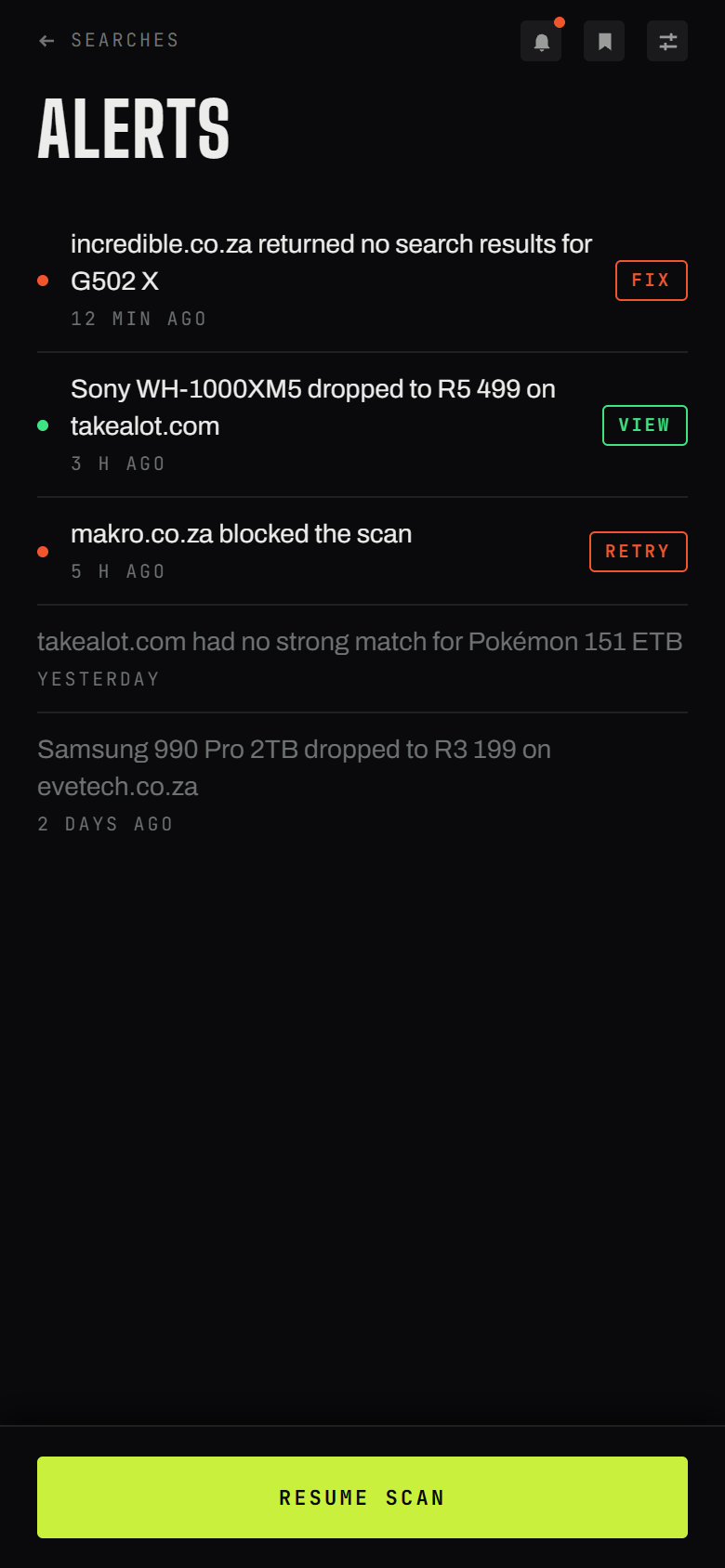 09 Alerts · errors and price drops in one inbox |
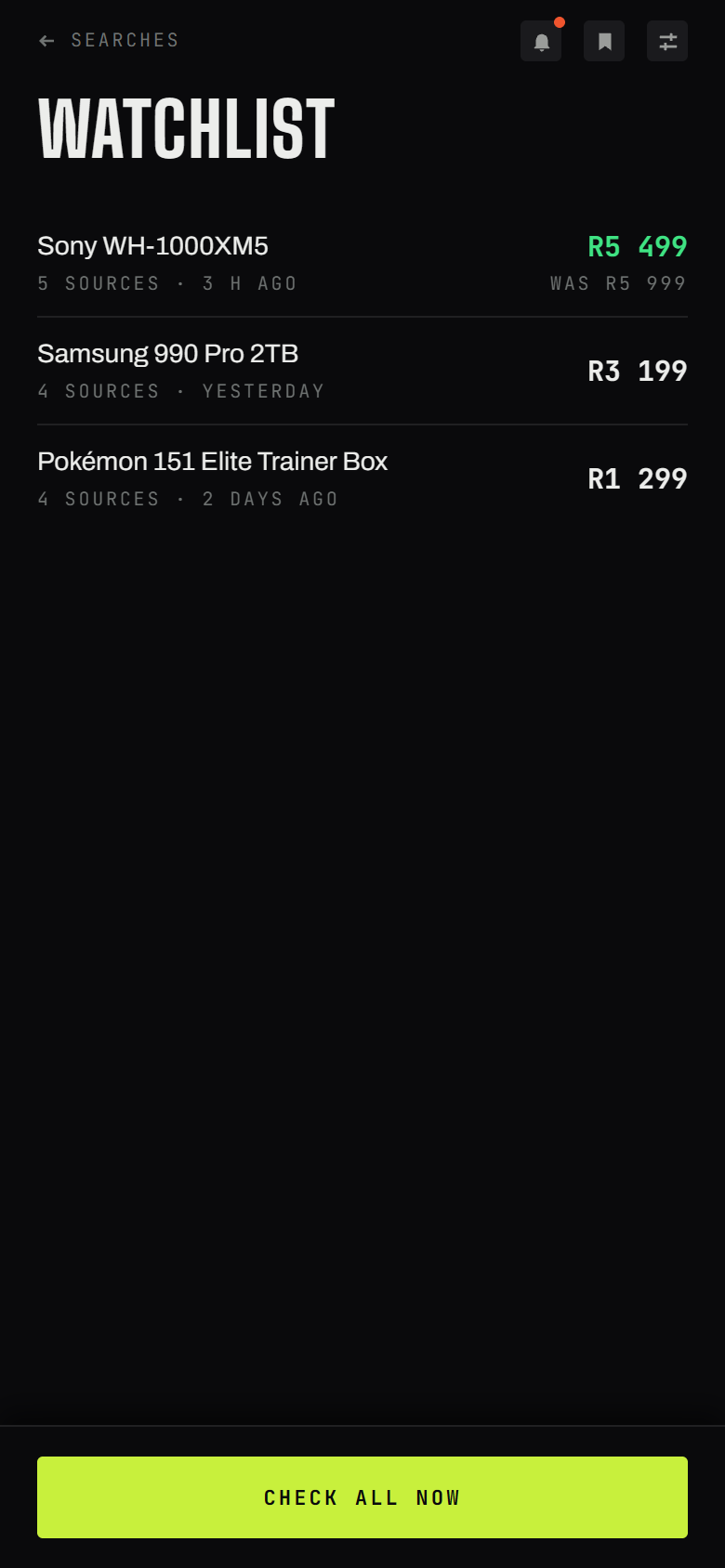 Watchlist · drops in mint |
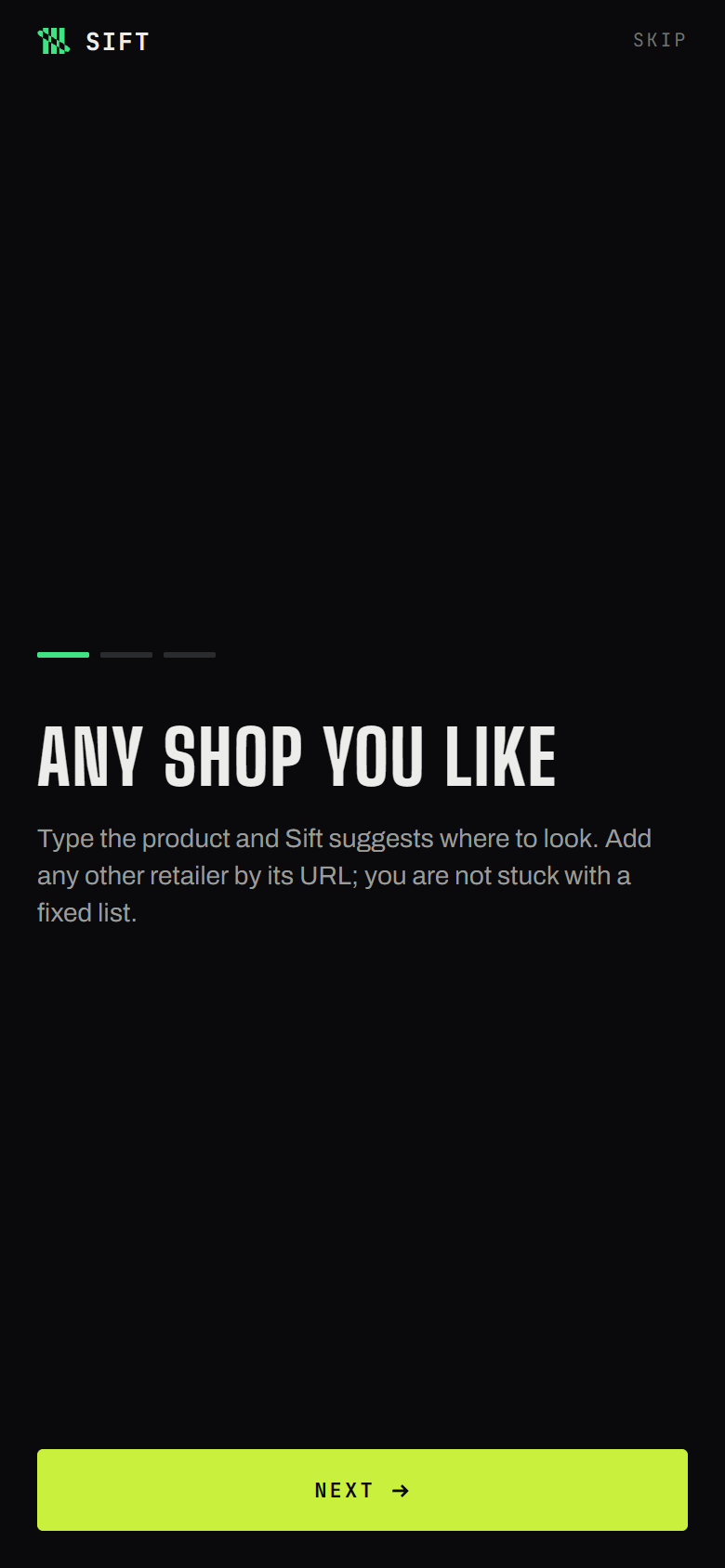 Onboarding · three-card tour |
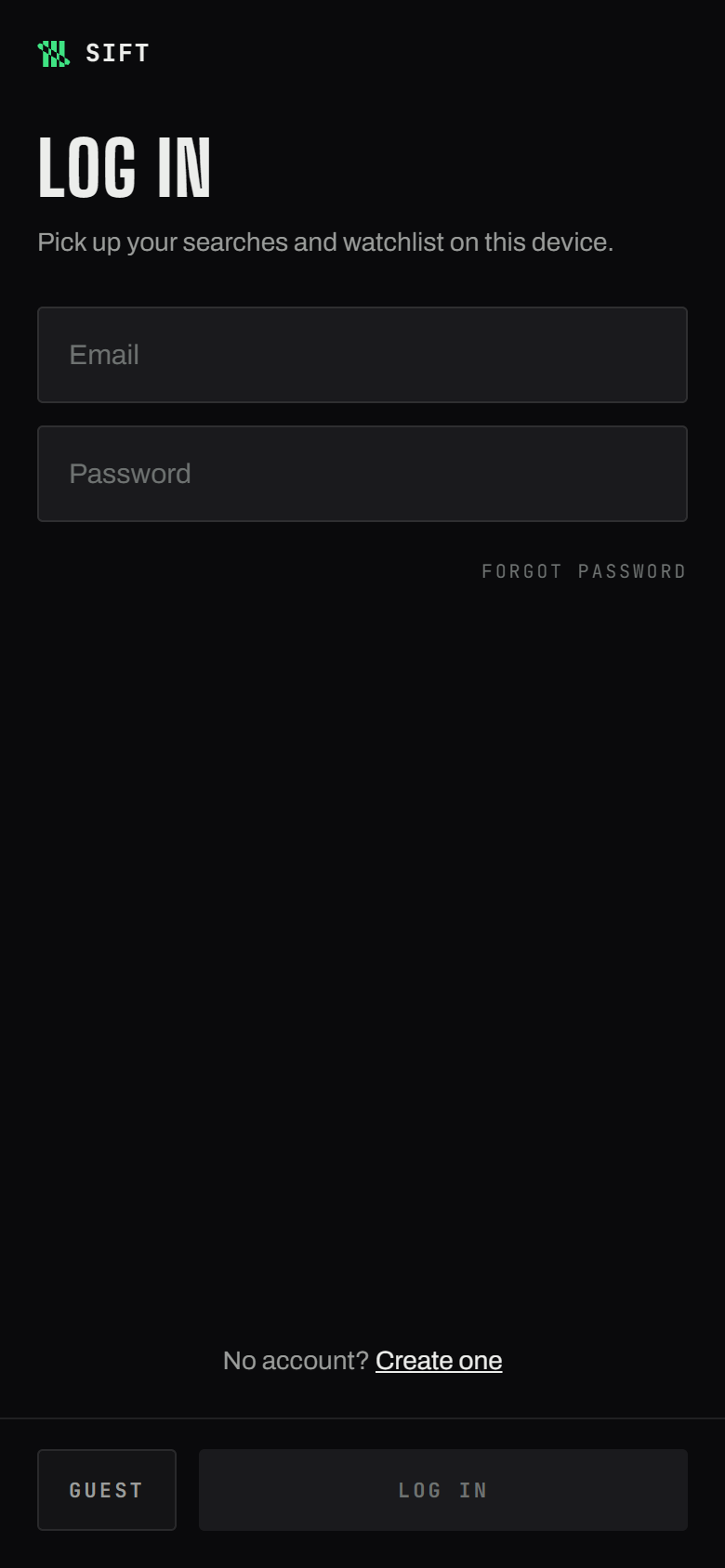 Auth · log in, sign up or continue as guest |
Landscape is where comparison earns its keep: the title, tracker and running totals sit in a left column and the results take the rest.
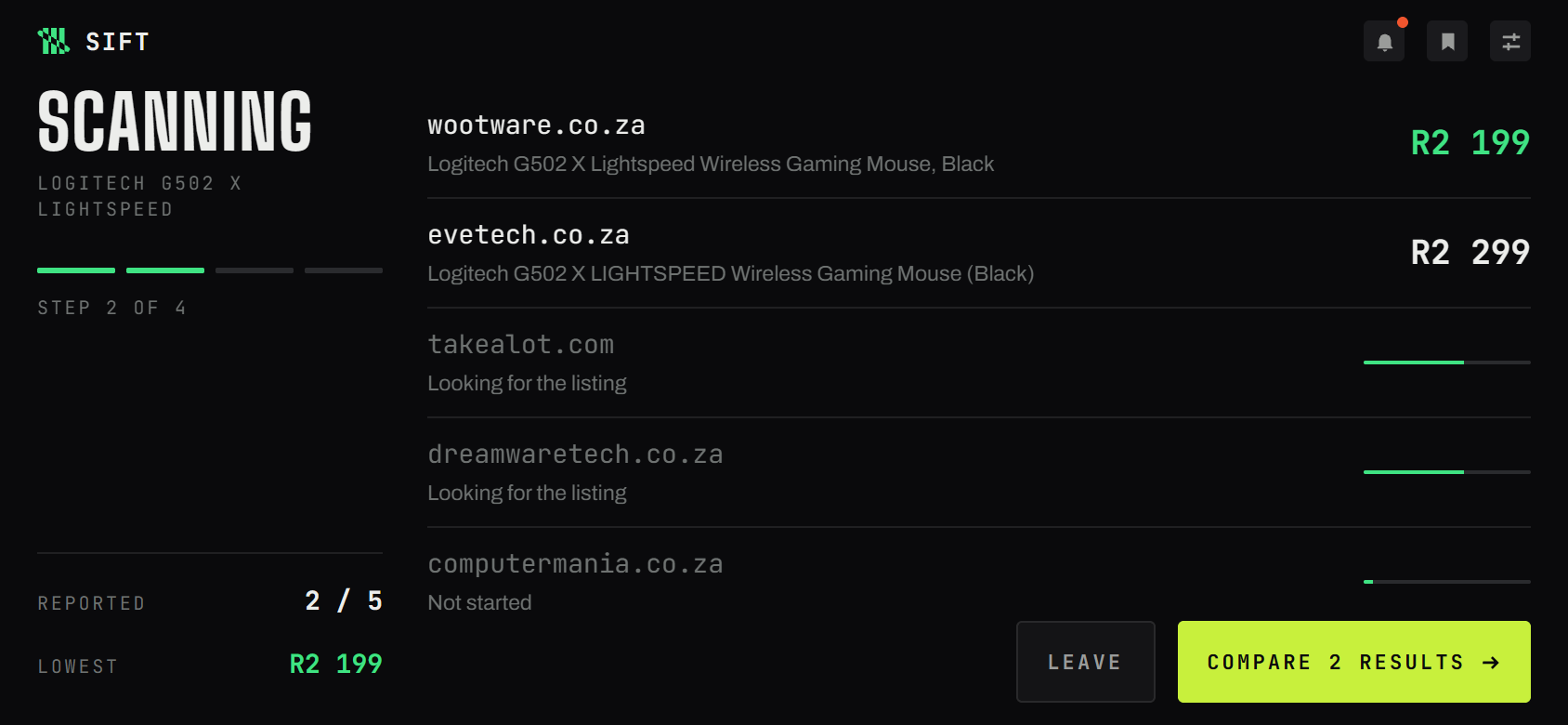 04 Scanning · rows fill in as each site answers |
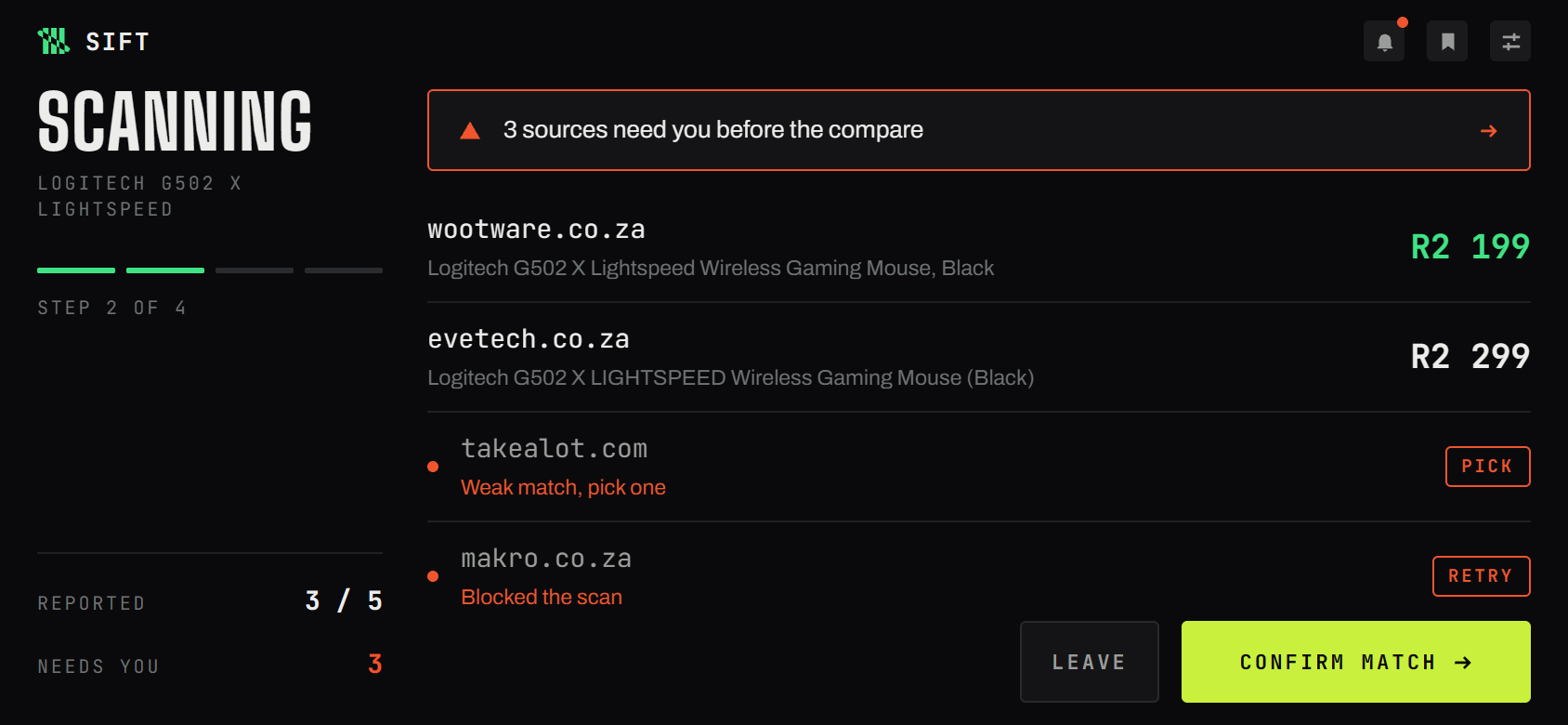 08 Scanning · errors · failures are row state with an inline fix |
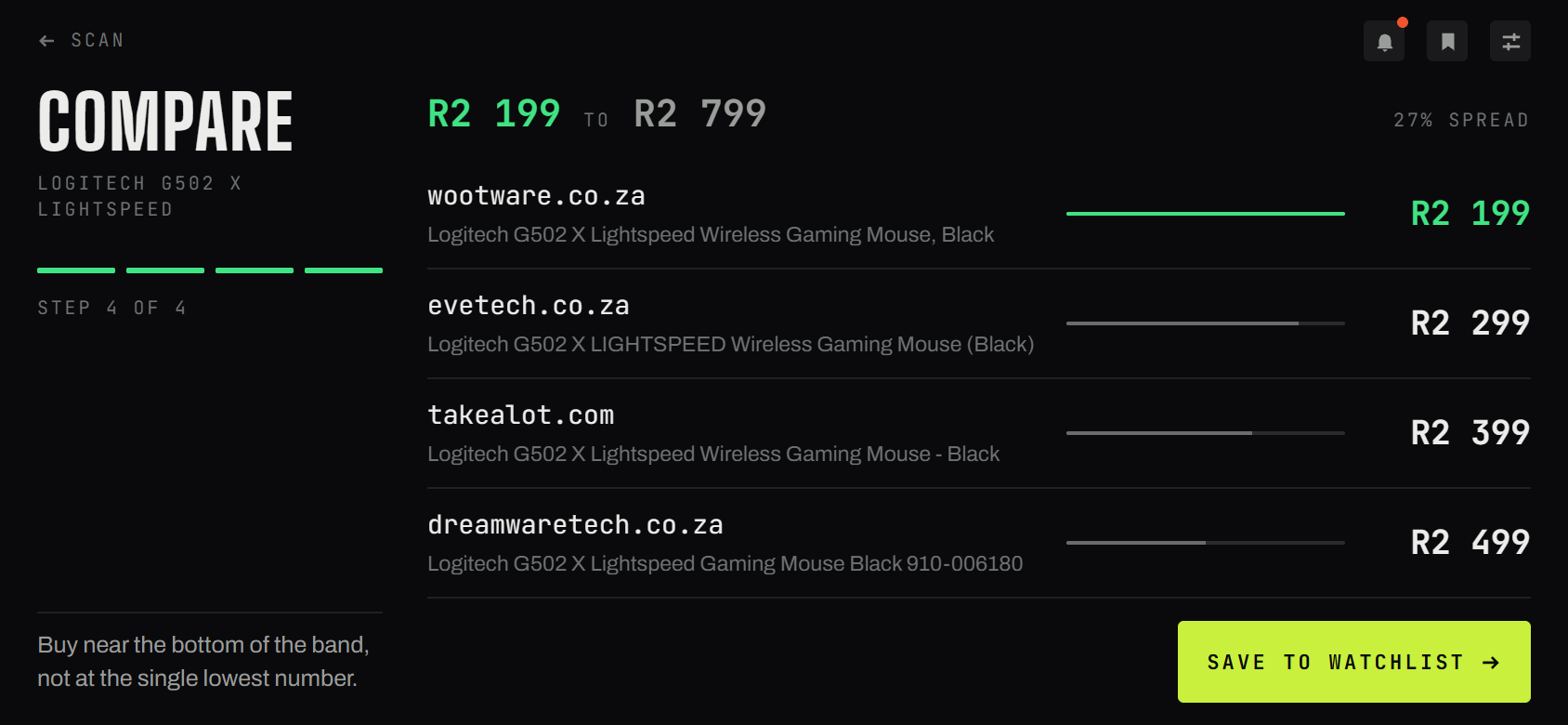 05 Compare · the band, the spread and one lesson |
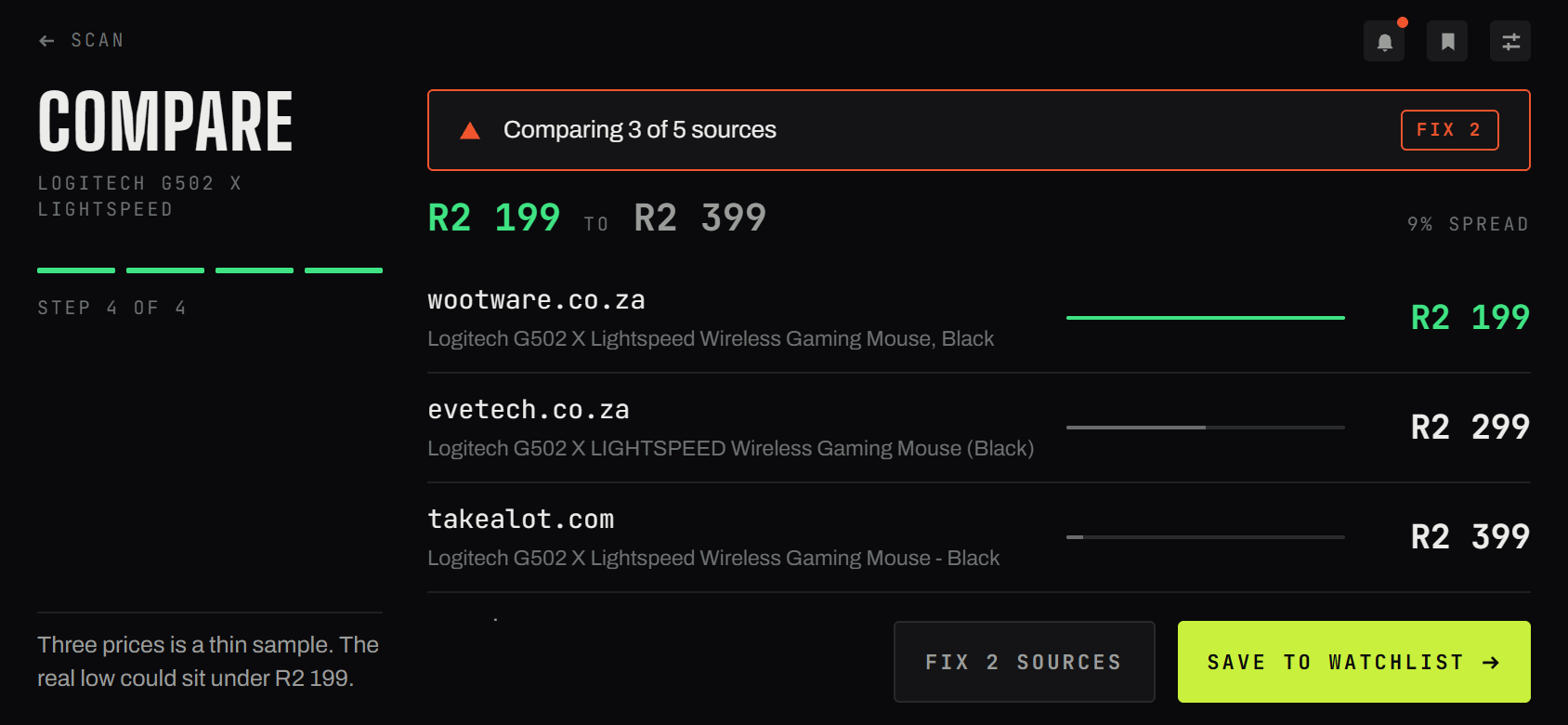 10 Compare · partial · a thin sample says so |
Walkthrough
A recorded run through the app: adding sources, watching results stream in, confirming a match and reading the results. The recording predates the redesign, so the screens above are the current interface; the flow it shows is unchanged.
If the player does not load, download the walkthrough (~100 MB).
Features
Implemented
- Save and resume. Every search records the step it is on (
sources,scan,confirm,compare) on each transition. The home screen leads with the most recent unfinished search, its lowest price so far and aResumebutton that lands on that step. A search typed but never started is kept on the device as a draft. - Recommended sources. Typing a product guesses a category from the preset keywords and ranks domains by whether the registry already knows the site, whether it is in that preset and whether the user has priced something similar there. The top three arrive selected, each with a one-line reason ("Page layout already known", "You priced Logitech G502 here 2 days ago"). The rest sit behind
Show n more, and+ Own URLadds any other retailer. Ranking lives insrc/lib/recommend.ts. - Source presets. Curated category bundles, reached from
Presetson the new search screen. One category opens at a time, each domain markedREADYif the registry knows its layout orFIRST RUNif not, andAdd n sourcesstages the lot. Curated by hand insrc/lib/presets.ts. - Live scanning. One row per source, filling in from the Firestore listener as each resolves: a meter while it works, the product title and price once it lands, the cheapest so far in mint. A side column counts
REPORTEDandNEEDS YOU. - Confirm matches. When match confidence drops below threshold, the user picks the right listing from candidate cards instead of getting the wrong product. When every candidate is weak,
Skip this sitebecomes the primary action, since a bad match drags the whole spread down. - Compare. Every priced listing on one line each: retailer, product title, a meter showing where the price sits in the band, and the price. The header gives the range and spread percentage, and one sentence teaches how to read it. Tapping a row opens the listing sheet, which opens the product in the device browser.
- Honest partial results. Failed sources stay visible as rows on the compare screen, with a banner saying how many of the sources were compared. When nothing comes back at all, the screen lists the cause per source and suggests a shorter product name.
- One error taxonomy.
blocked,no-results,weak-matchandtimeout, shared by scan rows, the banner and alerts. Each failure is row state, never a modal, and carries its own fix as an outlined tag:RETRY,PASTE URLorPICK. - Watchlist. Save a comparison to watch its lowest price. A drop shows in mint with the old price beside it, and
Check all nowrechecks every item. - Alerts inbox. Errors from the current run and watched price drops share one list, ember for problems and mint for drops. Unread items carry a dot and an action tag, and the bell in the top bar shows a dot while anything is unread.
- Landscape and portrait layouts. In landscape, every screen splits into a left column (title, tracker, running totals or the price lesson) and a main column with the action bar beneath it. In portrait the same blocks stack, with a floating action bar holding the one primary button. Layout follows the window shape. Landscape also hides the Android status and navigation bars.
- Splash, auth and onboarding. A boot screen waits while Firebase restores a persisted session, times out rather than hanging on an unreachable backend, and hands off to the login/signup gate or straight into the app. New users get a three-card tour, replayable from the account screen.
- Extraction pipeline. JSON-LD, Open Graph, microdata and heuristic HTML parsing, covered by unit tests against real and synthetic fixtures.
- Headless rendering fallback. A client-rendered storefront is rendered in a real headless Chromium browser before the same parsers run against the result, reached only once the plain-fetch tiers have both failed.
- Full resolution cascade. Registry lookup, generic search-form discovery, platform fingerprinting for nine ecommerce platforms, and a user-pasted search URL as the last resort. Everything discovered is written back to the shared registry.
- Paste-a-search-URL recovery. A source whose search page could not be found carries a
PASTE URLfix. It opens a screen asking for that retailer's search URL;Use this URLreruns the source with it, and the two escapes are trying the site again or dropping it and carrying on with the rest. - Match confidence scoring. Query tokens containing digits are weighted double, since those separate a variant from its siblings, and accessory listings are penalised. Below 60% the user is asked to pick.
- Server-side pipeline. A Firestore trigger resolves, fetches, extracts and scores every source, four at a time with one request per host, republishing per-source state as each one lands.
- Politeness layer. robots.txt is fetched and obeyed before any request, cached per origin, with per-host rate limiting and an honest user agent.
- Anonymous auth with guest upgrade. A first search needs no account. An email can be attached later without changing the uid, so saved searches survive.
- Scheduled price rechecks. Watched searches are rescraped nightly, each check appending a price point and moving the watchlist's lowest price, so a drop shows up in the watchlist and alerts.
Planned
- Extraction tiers 1 and 2, official APIs and internal JSON endpoints (stubbed, per-retailer work that scales badly, so deliberately scoped out)
- Push notifications for alerts and price drops. Needs
expo-notificationsand FCM/APNs credentials through EAS; today alerts show in-app only - Submission to the App Store and Play Store. EAS build profiles exist in
eas.json; no store build has been submitted
How it works
React Native cannot scrape arbitrary websites from the device. CORS, JavaScript-rendered pages, bot detection and mobile CPU all block it. Scraping therefore lives server-side in Cloud Functions, which write to Firestore, and the app subscribes to a real-time listener.
flowchart LR
    subgraph Device["React Native (Expo)"]
        UI[Screens and views]
        Store[Zustand flow store]
    end

    subgraph Firebase["Firebase"]
        Auth[Firebase Auth]
        FS[(Cloud Firestore)]
        subgraph Fn["Cloud Functions, Node 20"]
            T[onSearchCreated]
            C[confirmMatch]
            S[scheduledRecheck]
            RC[recheckSavedSearch]
        end
    end

    Retailers[(Retailer websites)]

    UI -->|writes a search doc| FS
    FS -->|trigger| T
    T -->|robots.txt, then fetch| Retailers
    S -->|nightly rescrape| Retailers
    T -->|listing docs, per-source progress| FS
    T -->|template write-back| FS
    S -->|price points| FS
    UI -->|callable| C --> FS
    UI -->|callable| RC --> FS
    FS -->|onSnapshot stream| Store --> UI
    Auth --- UI
Six functions deploy. onSearchCreated is the Firestore trigger that does the work; confirmMatch and recheckSavedSearch are callables the app invokes directly; scheduledRecheck is the nightly cron. resolveListingUrl and extractListing are single-stage callables exposed for testing one half of the pipeline in isolation, not used by the app's main flow.
Five of the six sit in africa-south1 alongside Firestore, which a Firestore trigger requires and which puts every read and write in-region. scheduledRecheck is the exception: Cloud Scheduler has no Johannesburg presence and rejects the region outright, so the cron runs from europe-west1. That costs cross-region Firestore reads once a night, and unlike onSearchCreated it is not a Firestore trigger, so nothing obliges it to sit with the database. Its schedule stays on Africa/Johannesburg time regardless of where it runs.
The pipeline is deliberately split in two. Resolution answers which page, extraction answers what is on it. Conflating them produces a scraper that only works if the user already found the product themselves.
Stage 1: resolution
| Order | Method | Status |
|---|---|---|
| A | Stored registry template for a known domain | Implemented |
| B | Generic search form discovery on the homepage | Implemented |
| C | Known ecommerce platform patterns (Shopify, WooCommerce, Magento) | Implemented |
| D | Ask the user to paste a search URL once | Implemented |
Nothing in this stage commits to an answer. Each method only proposes a URL; the homepage is fetched once and every method reads from that single response. The pipeline then tries the proposed URLs in order and accepts the first that actually yields prices matching the query. Only then is the template written back to the registry, so a route that looked plausible but returned a category page never poisons the next search.
That validation is what makes the write-back safe, and it is measurable: the first search against a new domain resolves by fingerprint, the second resolves by registry and returns faster.
Stage 2: extraction cascade
| Tier | Source | Status |
|---|---|---|
| 1 | Official retailer API | Future consideration |
| 2 | Undocumented internal JSON endpoint | Future consideration |
| 3 | Structured data: JSON-LD, Open Graph, microdata | Implemented |
| 4 | Heuristic HTML parsing | Implemented |
| 5 | Headless render, then tiers 3-4 against the result | Implemented |
Tiers 3-5 are fully generic and need no per-retailer configuration, which is what keeps the any-site promise intact. Tier 5 is the most expensive rung on the ladder, a real headless Chromium browser rather than a fetch, so it only runs once tiers 3 and 4 have both come back empty and the page looks client-rendered. Tiers 1 and 2 are per-retailer work that scales badly, so they are scoped out of the MVP and stubbed in place.
[!IMPORTANT] Where the scraper runs changes what it can reach, and how fast. This drove the choice of region, and it was measured rather than assumed.
An earlier run against
geekhome.co.zafromeurope-west1was refused at the transport layer:TCP reset. The site refused the connection, where the same query from a home connection returnedform-discovery, 12 candidates, top match 100%,MTG Teenage Mutant Ninja Turtles Bundleat R2 300, in 2 seconds. That looked like a permanent block on datacentre address space.Re-testing later with identical probes deployed side by side in both regions did not reproduce it. Both regions were served, with byte-identical responses, so the refusal was transient rather than structural. Retailer bot rules change, and a single failed measurement is not a standing property of the site.
What did reproduce, consistently across four trials, is latency:
Target africa-south1europe-west1geekhome.co.za/200, ~45ms 200, ~1350ms geekhome.co.za/search?q=…200, ~25ms 200, ~840ms evetech.co.za/search?query=…200, ~170ms 200, ~700ms Roughly 4x to 30x, for the same bytes. The pipeline fetches up to five candidate URLs per source, serially and rate-limited to one request per host, so that gap compounds across a single search. Firestore and every function except the nightly cron therefore live in
africa-south1.The local emulator path still matters, both because a home connection is the fallback if a retailer does start refusing datacentre ranges, and because tier 5 currently extracts more reliably there than in production. See the limitations below.
[!NOTE] Known limitations, measured against live sites. Tiers 3 and 4 read HTML. Five things stop that working, and all five were hit against real retailers rather than found in theory.
Limitation What happens The fix, and where it sits Client-rendered storefronts The page is a JavaScript shell with no search form and no prices. Most large South African retailers are built this way. Tier 5 headless rendering, implemented. Costs a browser rather than a fetch, so it only runs as the last resort Headless is slow, and slower deployed A render costs a Chromium launch plus however long the page needs, and a wrong guess spends its whole content budget before giving up. Deployed, one source can take ~50s across two candidate URLs against ~6s in the emulator. Bounded by a hard per-render deadline, and capped at two candidate URLs so a source cannot outlive the trigger's own 300s. Accepted cost of the last resort Datacentre IP blocking Was hit once as a TCP reset from europe-west1, and did not reproduce on re-test from either region. Cloudflare can also return403to hosting ranges.Treat as possible rather than certain. A home connection via the emulator is the fallback if it returns robots.txt on search paths Many storefronts allow /and disallow/search. That is a refusal, and SIFT honours it, including for a URL the user pasted themselves.Nothing to fix. The source is reported BLOCKEDNiche catalogues The shop simply does not stock the product, and its search returns unrelated items. Nothing to fix. Reported as such rather than as a failure Each is reported by name rather than as a generic failure, because "the site refused us from a datacentre", "the site is slow", "that domain does not exist" and "this shop does not stock it" each need a different response from the user.
Scraping ethics
Every outbound request goes through one function in functions/src/net/fetchPage.ts. It fetches robots.txt first, caches it per origin for an hour, and refuses any disallowed path outright. Requests are limited to one at a time per host and four hosts at once, with a ten second timeout. SIFT identifies itself as SiftBot rather than spoofing a browser user agent. Official retailer APIs are preferred wherever they exist.
Two details matter more than they look:
- A redirect can change the policy. An apex domain that allows everything often redirects to a
wwwhost whoserobots.txtis stricter. The policy that binds is the one on the host actually serving the content, so it is rechecked after the redirect. - One refused path is not a refused site. Storefronts commonly allow
/and disallow/search. That rules out one guessed route, not the domain, so the cascade continues and a source is only markedBLOCKEDonce every route it has was refused.
Technologies used
| Layer | Choice | Why |
|---|---|---|
| Language | TypeScript 6 (strict) | One language across app and functions, with shared Firestore document types |
| Framework | React Native 0.86 via Expo SDK 57 | Single codebase for iOS, Android and web |
| Navigation | Expo Router | File-based routing with typed routes |
| State | Zustand | Small store, no Redux boilerplate |
| Orientation | expo-screen-orientation | Rotation explicitly unlocked, with useWindowDimensions driving layout switching |
| Typography | Big Shoulders Display, JetBrains Mono, Archivo | Display, data and longform roles kept visually distinct |
| Graphics | react-native-svg | The SIFT mark and a small set of filled geometric icons |
| Motion | react-native-reanimated 4 | The boot screen hand-off |
| Local drafts | AsyncStorage | A search typed but not yet started survives the app closing |
| Auth | Firebase Auth | Persisted to AsyncStorage on device |
| Database | Cloud Firestore | NoSQL with real-time listeners, which the Real-Time Data card demands |
| Backend runtime | Cloud Functions v2 on Node 20 | Server-side scraping on the Blaze plan with a budget cap |
| HTML parsing | Cheerio | Fast server-side DOM traversal for tiers 3 and 4 |
| Headless rendering | playwright-core, @sparticuz/chromium | Tier 5: renders client-rendered pages before tiers 3-4 parse the result |
| Politeness | robots-parser, p-limit | robots.txt compliance and concurrency limiting |
| Admin writes | firebase-admin | Listings and templates are function-written only |
| Local dev | Firebase Emulator Suite in Docker Compose | Reproducible backend with no cloud spend |
| Testing | node:test with ts-node |
Extraction parsers tested against HTML fixtures |
| Linting | ESLint 9 with eslint-config-expo | Flat config |
| Store builds | EAS Build and EAS Submit | Planned for App Store and Play Store release |
Installation
Prerequisites
| Tool | Version | Notes |
|---|---|---|
| Node.js | 20 LTS | Functions pin Node 20, so match it locally |
| npm | 10+ | Ships with Node 20 |
| Docker Desktop | Latest | Runs the Firebase Emulator Suite. Only needed for the backend |
| Git | Any | |
| Expo Go | Latest | On a phone, if testing on a physical device |
| Java 21 JRE | - | Only if running the emulators outside Docker. firebase-tools 15 refuses anything older |
Xcode is needed for the iOS simulator (macOS only) and Android Studio for the Android emulator. Neither is required if you test in a browser or in Expo Go.
1. Clone and install
git clone https://github.com/KeaganCB-OW/SIFT.git
cd SIFT && npm install && npm install --prefix functions
2. Environment variables
Copy the example file and fill in your Firebase web app config from Firebase Console, Project settings, Your apps.
cp .env.example .env
On Windows PowerShell:
Copy-Item .env.example .env
EXPO_PUBLIC_FIREBASE_API_KEY=
EXPO_PUBLIC_FIREBASE_AUTH_DOMAIN=
EXPO_PUBLIC_FIREBASE_PROJECT_ID=
EXPO_PUBLIC_FIREBASE_STORAGE_BUCKET=
EXPO_PUBLIC_FIREBASE_MESSAGING_SENDER_ID=
EXPO_PUBLIC_FIREBASE_APP_ID=

# Point the app at the emulator suite rather than the real project
EXPO_PUBLIC_USE_FIREBASE_EMULATOR=false
[!TIP] SIFT needs a backend, which means either a real project or the local emulator suite. With
EXPO_PUBLIC_FIREBASE_API_KEYandEXPO_PUBLIC_FIREBASE_PROJECT_IDblank andEXPO_PUBLIC_USE_FIREBASE_EMULATOR=false, the app still launches and every screen is navigable, but there is nothing behind them: no accounts, no scraping, no watches, and the status line readsNO BACKEND. SettingEXPO_PUBLIC_USE_FIREBASE_EMULATOR=trueis enough on its own, since the emulators accept a placeholder project. The account panel, opened from the account button, says so directly. Point the app at the Docker emulator suite below, or at a real project, to get anything back. The seeded demo dataset that used to fill this gap has been removed: a fake dataset that drifts from the real pipeline is worse than an honest empty screen.
3. Database and backend (Docker)
The emulator suite gives you Firestore, Auth and Functions locally with no cloud project and no billing. It is also the only way to scrape retailers that refuse datacentre traffic, since requests then leave through your own connection.
Set this in .env to point the app at it:
EXPO_PUBLIC_USE_FIREBASE_EMULATOR=true
The image installs JDK 21 from Adoptium, because firebase-tools 15 refuses anything older, and the emulators bind to 0.0.0.0 so the published ports are reachable from the host.
docker compose up
| Service | Port | URL |
|---|---|---|
| Emulator UI | 4000 | http://localhost:4000 |
| Functions | 5001 | http://localhost:5001 |
| Firestore | 8080 | http://localhost:8080 |
| Auth | 9099 | http://localhost:9099 |
Firestore rules and indexes are applied from firestore.rules and firestore.indexes.json on start, and emulator state is exported on exit so seeded data survives a restart.
Running the emulators without Docker
Install the Firebase CLI and a Java 21 JRE, then:
npm install -g firebase-tools
cd functions && npm run serve
npm run serve builds the TypeScript and starts the functions emulator. Use firebase emulators:start from the repo root for the full suite.
Working on the Cloud Functions
Run the compiler in watch mode in one terminal while the emulators run in another.
cd functions && npm run build:watch
Other scripts: npm run shell for an interactive functions shell, npm run logs for deployed logs, npm run deploy to push to the project named in .firebaserc.
4. Deploying to a real Firebase project (optional)
Only needed if you want the app running against live Firebase rather than the emulators.
firebase login
firebase use --add
firebase deploy --only firestore:rules,firestore:indexes,functions
[!IMPORTANT] Cloud Functions make outbound requests to retailer sites, which the Firebase free tier does not allow. The project needs the Blaze plan with a budget cap configured.
5. Run the app
npx expo start
Then choose a target:
| Environment | Command | Notes |
|---|---|---|
| Web (quickest for review) | npm run web |
Opens on http://localhost:8081. A window wider than it is tall shows the landscape layout |
| Android emulator | npm run android |
Needs Android Studio with a device image |
| iOS simulator | npm run ios |
macOS with Xcode only |
| Physical device | npx expo start then scan the QR code |
Needs Expo Go and the phone on the same network |
Lecturer quick start: no Firebase account, about five minutes
git clone https://github.com/KeaganCB-OW/SIFT.git
cd SIFT && npm install
Start the emulator suite in one terminal. It needs no cloud project and no billing:
docker compose up
Then, with EXPO_PUBLIC_USE_FIREBASE_EMULATOR=true in .env, start the app in a second terminal:
npm run web
That runs the real pipeline against local Firestore, Auth and Functions. Make the window wider than it is tall for the landscape layout, or use the browser's device toolbar at 390 × 844 for portrait. Running npm run web on its own still launches the app, but with no backend behind it the screens are empty.
Troubleshooting
| Symptom | Fix |
|---|---|
| Metro cache errors after dependency changes | npx expo start --clear |
| Fonts render as system default | Wait for the splash screen to finish; fonts load asynchronously through expo-font |
| Ports 4000, 5001, 8080 or 9099 already in use | Stop other Firebase emulators, or change the ports in docker-compose.yml and firebase.json |
| Physical device cannot reach Metro | Put the phone on the same Wi-Fi network, or run npx expo start --tunnel |
| Portrait layout not appearing | Make the window taller than it is wide on web, or rotate the device. Layout follows the window shape, not a lock |
firebase/auth type error in the editor |
Known and suppressed. getReactNativePersistence is resolved by Metro's react-native export condition but not by tsc |
Usage
Every screen has one primary action, the acid button in the action bar, with an optional ghost button beside it. The top bar carries back navigation and three icons: alerts, watchlist and account. Inside a search, the four-step tracker shows where you are.
flowchart LR
    H["Home"] -->|New search| S["1. Sources"]
    H -->|Resume| L
    S -->|Presets| P["Presets"]
    P -->|Add sources| S
    S -->|Start scan| L["2. Scan"]
    L -->|weak match| C["3. Confirm"]
    L -->|no search results| F["Site failed"]
    F -->|Use this URL| L
    C -->|Confirm or skip| L
    L -->|Compare n results| R["4. Compare"]
    R -->|Save to watchlist| W["Watchlist"]
Home
The searches screen. An unfinished search sits at the top as a card with its lowest price so far, the tracker and Resume, which opens the step it was left on. Earlier searches follow as rows with their lowest price: three shown, the rest behind Show n more. A search that was typed but never started comes back here as a draft.
1. Sources
Type a product. SIFT suggests where to look, three sites pre-selected, each with the reason it was picked. Tap a row to add or remove it, Show n more for the rest of the ranking, Presets for a curated bundle and + Own URL for any other retailer. Pasted URLs are stripped back to the bare domain.
2. Scan
Rows fill in one per source as the pipeline answers: a meter while it works, then the product title and price. Leave at any point; the scan keeps running server-side and the home screen picks it up. A source that needs you turns ember with its reason and fix, and a banner counts how many need attention before the compare. Tapping a priced row opens its listing sheet.
3. Confirm
Where confidence was low, the closest listings from that site are shown as cards with title, price and match percentage. Pick one and confirm. When all of them are weak matches, skipping the site is the primary action and using the best of them is the ghost.
Site failed
When a site's search page could not be found, paste the URL of its results page. A route that works is written back to the shared registry, so the domain resolves on its own for everyone from then on. Otherwise try the site again or drop it and carry on.
4. Compare
The range, from the lowest price in mint to the highest, and the spread between them. Each retailer is one row, its meter full at the bottom of the band and shrinking toward the top. One sentence carries the Learn Something goal: buy near the bottom of the band, not at the single lowest number. When some sources failed, they stay in the list and the sentence warns that a thin sample may hide a lower price.
Watchlist and alerts
Save to watchlist keeps a comparison's lowest price under watch, rechecked nightly or on demand with Check all now. Alerts collect the current run's failures and any watched price drops in one list, each with the action that resolves it.
Landscape support
In landscape, each screen splits into a 230 px left column with the title, tracker and running totals, and a main column holding the rows and the action bar. Android's status and navigation bars are hidden in landscape. In portrait the same blocks stack into one column. Layout is chosen from useWindowDimensions, so both orientations ship rather than one being locked out.
Data model
Firestore, six collections. Shared TypeScript interfaces live in src/types/firestore.ts for the client and functions/src/types/index.ts for the backend.
erDiagram
    users ||--o{ searches : owns
    users ||--o{ savedSearches : watches
    searches ||--o{ listings : produces
    savedSearches ||--o{ pricePoints : records
    retailerTemplates }o--|| listings : "resolved via"

    users {
        string uid PK
        string email
        string displayName
        boolean isAnonymous
        Timestamp createdAt
    }
    searches {
        string id PK
        string userId FK
        string query
        string status "pending resolving extracting complete failed"
        array sources "domain status method reason"
        map userSearchUrls "domain to pasted search URL"
        number resolvedCount
        string step "sources scan confirm compare, the resume pointer"
        Timestamp stepUpdatedAt
        number lowestPrice "lowest seen so far, for the home screen"
        Timestamp createdAt
        Timestamp updatedAt
    }
    listings {
        string id PK
        string searchId FK
        string retailerDomain
        string url
        string title
        number price
        string currency
        boolean inStock
        number matchConfidence
        number confidenceBadge "1 to 4"
        number extractionTier "1 to 5"
        boolean needsConfirmation
        boolean confirmedByUser
        array candidates "runners-up for the confirm step"
        Timestamp scrapedAt
    }
    savedSearches {
        string id PK
        string userId FK
        string query
        array sources
        number lowestPrice
        number previousLowestPrice
        number sourceCount
        Timestamp lastCheckedAt
    }
    pricePoints {
        string id PK
        string savedSearchId FK
        number price
        Timestamp observedAt
    }
    retailerTemplates {
        string domain PK
        string resolutionMethod
        string searchUrlPattern
        Timestamp lastValidatedAt
        number successCount
        number failureCount
        number confirmedMatchCount
    }
Security rules in firestore.rules scope users, searches and savedSearches to their owner. A search is created by the client, which may afterwards update only its resume pointer (step, stepUpdatedAt) and lowestPrice; everything else about the run is written by the pipeline. listings are readable only by the owner of their parent search and never client-writable, so the confirm step has to go through the callable. retailerTemplates are readable by any signed-in user, because that is the point of write-back: a site solved once is solved for everyone after.
Four composite indexes back the queries that need them: listings sorted by price within a search, a user's searches newest first, a user's saved searches by last update, and the price history series in observation order.
Testing
Scraping is the part most likely to break silently, so it is covered by 62 tests against fourteen HTML fixtures, including a real retailer page saved from books.toscrape.com and a client-rendered page with no prices in the markup.
npm test --prefix functions
| Suite | Covers |
|---|---|
extraction |
JSON-LD products, products nested in @graph, Open Graph price meta, microdata, heuristic parsing with no price class, candidate extraction from an ItemList and from repeated cards, and correct null returns when a page carries nothing extractable |
resolution |
Search-form discovery including hidden scope fields and skipped POST forms, platform fingerprinting, template building and validation, and turning a user-pasted URL into a reusable template |
matching |
Exact matches, wrong storage variants, accessories that match the query word for word, and the confidence-to-badge mapping |
headless |
Tier 5's wiring around the browser: a failed render returning nothing, a rendered page being handed to the same tier 3-4 parsers, and results tagged tier 5. The browser itself is not launched here, since @sparticuz/chromium ships a Linux-only binary and this suite also runs on Windows |
net |
Telling a mistyped domain, a refused connection, a certificate problem and a genuine timeout apart, and the www fallback for three-label ccTLD domains |
pipeline |
The whole scrape end to end against a local HTTP server: robots.txt fetched first and obeyed (including after a redirect to a stricter host), the search URL derived from the homepage, a URL that just returns the homepage rejected, the results page parsed, and each failure mode reporting its own reason |
The pipeline suite runs without Firebase, which also proves the registry degrades rather than throwing when Firestore is unavailable.
The one piece of frontend logic with a failure mode you cannot see by looking at it, the recommended-sources ranking, carries its own runnable check:
npx tsx src/lib/recommend.check.ts
It asserts the category guess, the ranking order and the reason shown beside each suggested site.
Smoke-testing the deployed backend
The unit suites never touch the network or a browser, so they cannot tell you whether what is deployed actually works. This does: it signs in anonymously, writes a real search document and waits for the trigger to resolve, scrape and score it, exactly as the app would.
node scripts/smoke-production.mjs evetech.co.za "ddr4 ram"
     5s  extracting · RESOLVING
    26s  complete · RESOLVED

  tier 5 · ZAR 1599 · confidence 0.67
  klevv-bolt-x-8gb-ddr4-3200-memory
  5 runners-up, method registry
It always talks to the deployed project, whatever EXPO_PUBLIC_USE_FIREBASE_EMULATOR is set to, since the point is to check production. Exit code is 0 on complete and 1 on failed, so it works in CI.
Two arguments worth keeping to hand: evetech.co.za "ddr4 ram" exercises the whole cascade down to a tier 5 headless render, and scrapeme.live charjabug resolves in about five seconds on tier 3 without a browser, which is the quicker check that the backend is up at all.
Lint the app with:
npm run lint
Project structure
SIFT/
├── src/
│   ├── app/                   Expo Router screens
│   │   ├── index.tsx          Splash and boot sequence
│   │   ├── auth.tsx           Login and signup gate
│   │   ├── onboarding.tsx     Three-card tour
│   │   └── app.tsx            The app shell: picks which view is showing
│   ├── components/
│   │   ├── ui/                Primitives: Screen, top bar, action bar, tracker, row, meter, tag, banner, icons
│   │   └── sift/              SIFT mark, listing sheet
│   │       └── views/         The ten screen views
│   ├── constants/
│   │   └── sift-theme.ts      Design tokens, single source of truth
│   ├── hooks/
│   │   ├── use-sift-flow.ts   View model: derived UI state and actions
│   │   ├── use-auth.ts        Anonymous sign-in, guest upgrade, sign-out
│   │   ├── session/           Live Firestore session
│   │   ├── use-orientation.ts
│   │   └── use-orientation-policy.ts
│   ├── lib/
│   │   ├── firebase.ts        Client init and emulator wiring
│   │   ├── searches.ts        Firestore queries and listeners
│   │   ├── map-to-view.ts     Firestore documents to view models
│   │   ├── registry.ts        Is this domain already solved for everyone?
│   │   ├── presets.ts         Curated source categories, hand-maintained
│   │   └── recommend.ts       Suggested sites and their reasons, with its check
│   ├── store/                 Zustand flow store (UI state only)
│   └── types/                 Firestore document types and view model types
├── functions/src/
│   ├── net/                   robots.txt, rate limiting, outbound fetch, headless browser
│   ├── resolution/            Stage 1: registry, form discovery, platform patterns
│   ├── extraction/            Stage 2: the five-tier cascade and candidate extraction
│   ├── matching/              Match confidence scoring
│   ├── pipeline/              Search orchestration, confirm-match, scheduled rechecks
│   ├── types/                 Shared backend types
│   └── index.ts               Function exports
├── assets/                    App icon and native splash mark
├── docker-compose.yml         Emulator suite
├── Dockerfile.emulators       Node 20, JDK 21, firebase-tools, Chromium libraries
├── firebase.json              Emulator ports, rules, function config
├── firestore.rules            Security rules
└── firestore.indexes.json     Composite indexes
Design system
The interface follows the Screen preview v2 page of the SIFT Figma file. Every colour, size and font comes from src/constants/sift-theme.ts.
| Token group | Contents |
|---|---|
SiftColors |
A grey ramp (canvas, surface, surfaceHi, hairline, text, textDim, textMute) and three accents |
SiftFontFamily |
Big Shoulders Display for titles, JetBrains Mono for data and labels, Archivo for prose |
SiftType |
Title, label, data, price, body and small roles |
SiftSpacing |
A 4px scale, s1 to s7 |
SiftRadius |
Fixed at 3 on every surface, control and bar |
Three accents, each with one job:
| Colour | Hex | Meaning |
|---|---|---|
| Acid | #C8F03C |
The user's action. One filled button per screen, nothing else |
| Mint | #3FE383 |
The app talking: completed steps, the lowest price, a confirmed match, a focused input |
| Ember | #F0552E |
Breakage only: a dot, the reason text, an outlined fix tag, a banner border |
No gradients, no glows, no coloured shadows; the only shadow is under the portrait action bar. Lists are rows separated by hairlines, and a card appears only where elevation means something, such as the resume card or a selected candidate. Prices are always set in JetBrains Mono Bold so columns of figures line up, and product titles in Archivo because they are names, not data.
Status is never carried by colour alone. Every failed row, tag and banner also carries its reason in words.
Project status
| Area | State |
|---|---|
| Design system and tokens | Complete |
| Redesign to Screen preview v2, landscape and portrait | Complete |
| Save and resume | Complete |
| Recommended sources | Complete |
| Error taxonomy and inline fixes | Complete |
| Push notifications for alerts | Planned |
| Flow state machine and Zustand store | Complete |
| Resolution methods A to D | Complete, tested |
| Extraction tiers 3 and 4 | Complete, tested |
| Extraction tier 5, headless rendering | Complete, tested |
| Match confidence and confirm step | Complete, tested |
| Politeness: robots.txt and rate limiting | Complete, tested |
| Search pipeline and real-time streaming | Complete |
| Scheduled saved-search rechecks | Complete |
| Firebase Auth with guest upgrade | Complete |
| Frontend wired to live Firestore | Complete |
| Deployed and verified against live sites | Complete |
Firestore and functions in africa-south1 |
Complete. Cron stays in europe-west1, Cloud Scheduler has no Johannesburg region |
| Firestore schema, rules, indexes | Complete |
| Docker emulator environment | Complete |
| EAS build profiles | Complete |
| Paste-a-search-URL recovery | Complete |
| Splash, auth gate and account panel | Complete |
| Curated source presets | Complete. Categories are hand-maintained |
| Extraction tiers 1 and 2 | Future consideration |
| Store submission | Planned |
Team and contributions
| Contributor | Role | Contributions |
|---|---|---|
| Keagan Boucher (@KeaganCB-OW) | Sole developer and designer | Concept and pitch, SIFT design system and tokens, the Screen preview v2 redesign and every screen built from it, flow state machine, landscape and portrait layouts, Firestore schema and security rules, resolution and extraction pipelines, backend test suite, Docker emulator environment, documentation |
Contributing
Work happens on feature branches off main, with focused commits per unit of work. If you are extending the project, keep the split: resolution logic in functions/src/resolution/, extraction logic in functions/src/extraction/, and every visual value sourced from sift-theme.ts.
Acknowledgements
Documentation and references
- Expo SDK 57 documentation, the versioned reference this project is built against
- Expo Router for file-based navigation
- React Native
- Firebase documentation, particularly Firestore data modelling, security rules and the Emulator Suite
- Cloud Functions for Firebase, 2nd gen
- Cheerio for server-side HTML parsing
- Zustand for state management
- schema.org/Product and the Open Graph protocol, which define the structured data tier 3 reads
Libraries and tooling
- robots-parser and p-limit for polite, rate-limited scraping
- React Native Reanimated and react-native-svg by Software Mansion
- Firebase Emulator Suite running in Docker Compose
Typefaces, all served through Google Fonts via @expo-google-fonts
- Big Shoulders Display by Patric King, Occupant Fonts
- JetBrains Mono by JetBrains
- Archivo by Omnibus-Type
Test fixtures
- books.toscrape.com, a sandbox published explicitly for scraping practice. Used for the real-page extraction fixture so no live retailer is hit during testing.
Guidance
- Tsungai Katsuro and William Basson for their continued guidance and critique of this project.
- The project was scaffolded from the Expo default template, which is MIT licensed and 650 Industries' copyright. SIFT itself is released under AGPLv3
Licence
Released under the AGPLv3 Licence.
Next
She is Design
A community platform for female design students